The Russians are at it again

Mac users, we had a three-month respite. The Russian Zlob gang, which last September lost its servers that were distributing the Mac DNSchanger malware when the corrupt hosting company EST Hosts went dark, are back after Macs again.

Just discovered a server being used to spread Mac malware from

http://brakeplayer.net/download/get7003.dmg
*** WARNING *** WARNING *** WARNING *** This link is live as of the time of this writing. The payload, named get7003.dmg, contains a new version of the Mac DNSchanger, aka OSX.RSplug.A, OSX.RSplugin.A, or OSX/Zlob, computer malware.

The malicious server brakeplayer.net is brand new and is hosted in Latvia, on an ISP called “zlkon.lv”.

whois brakeplayer.net

Whois Server Version 2.0

Domain names in the .com and .net domains can now be registered
with many different competing registrars. Go to http://www.internic.net
for detailed information.

Domain Name: BRAKEPLAYER.NET
Registrar: REGTIME LTD.
Whois Server: whois.regtime.net
Referral URL: http://www.webnames.ru
Name Server: NS1.BRAKEPLAYER.NET
Name Server: NS2.BRAKEPLAYER.NET
Status: ok
Updated Date: 26-dec-2008
Creation Date: 15-dec-2008
Expiration Date: 15-dec-2009
Name servers:
ns1.brakeplayer.net
ns2.brakeplayer.net

Registrar: Regtime Ltd.
Creation date: 2008-12-15
Expiration date: 2009-12-15

Registrant:
Nikolaj Selivestrov
Email: paul.aspen111@gmail.com
Organization: Private person
Address: ul. kosmonavtov, 132-13
City: Moskva
State: Moskovskaya
ZIP: 129301
Country: RU
Phone: +7.4957854978

I’ve also noticed an uptick in the number of hacked Web sites hosted by iPower Web lately. As I’ve talked about extensively here, here, here, and here, iPower is basically a mess. For more than a year now, hackers have been walking all over their servers, planting virus redirectors in sites that are hosted by iPower or their subsidiaries.

For a while, the number of attacks against iPower dropped to next to nothing, and I thought that they’d fixed their security problem. Now, Im not so sure–now, I think that iPower is as compromised as it always has been, but the hackers toned down the attacks when they started getting attention. Can’t prove it, but my hunch is there’s a long-standing zero-day exploit in vDeck, iPower Web’s home-grown Web control panel software.

I think we’re going to be seeing more Mac malware in the near future.

Woot! Score one for the good guys

Yesterday, I talked about how the Russian Zlob gang was abusing open redirectors on the Net to seed Google with links to malware. I’d made a list of such open redirectors over the past few days, and have been contacting the owners of the redirectors explaining the problem and how to fix it.

Last night, I found an open redirector on the usa.gov site, which was being used in Google links to spread malware. I fired off an email to the usa.gov Webmaster explaining the problem. This morning I got a very nice email reply saying they’d verified the problem and fixed it; the redirector now does referrer checking and refuses to redirect for non-local requests. Checked it out, and sure enough, it was fixed.

Woot! They had a patched script up within hours. Who says the government is always slow and inefficient?

Another day, another new computer virus distribution technique

I’ve spent quite a lot of time in this journal posting about a particular group of Russian computer virus writers, starting from when I first discovered last year that my name was being used to poison Google keyword searches and drive traffic to Web sites that attempt to download malware onto computers. (Does that make me an official net.celebrity?) I’ve made it something of a hobby to follow this particular group, and have written about how they have repeatedly hacked an ISP called iPower Web to spread viruses, and how they’ve built an elaborate underground computer network to funnel traffic to virus-infected Web sites.

Along the way, they’ve changed tactics a number of times. The hacks against iPowerWeb are still ongoing, though they seem to have slowed; at the height of the attack, iPower was hosting tens of thousands of newly-hacked Web sites per day, though now it’s slowed to a paltry trickle…at any given time these days, there are only a couple hundred hacked Web sites living on iPower’s servers. When the post about iPower first went live last December, I was flooded with emails from folks saying “My Web site is hosted by iPower and I’ve been hacked!” and I even got two phone calls from iPowewr customers whose Web sites had been penetrated. (Yes, my phone number is out there, for folks who want to dig it up. No, I’m not gonna tell you what it is.)

The interesting thing about this particular computer gang is their adaptability. They’re constantly changing targets, and as time goes on their underground network grows larger and more resilient.

In the past, they’ve planted redirectors to malware sites on hacked Web servers, they’ve exploited security flaws in software like phpBB and WordPress to redirect traffic to virus droppers, they’ve set up fake FaceBook profiles that redirect visitors to virus-infected sites, and they’ve even created fake Google Groups to direct traffic to virus sites.

In the past couple of weeks, though, I’ve seen a whole new approach, and it’s all about exploiting open redirectors.

We’re going to get technical under here!

Scams, hackers, phishes, and fraud: keeping yourself safe

(Note: This is Part 1 of what will probably be an ongoing and irregularly-updated tutorial on how not to fall for fraud, phishes, and scams on the Internet.)

Let’s start by talking about one of the most common kinds of email fraud: a “phish” email.

A typical phish email–you’ve probably received at least one, I know I get about twelve a day–is an email that comes from an official-looking email address. It says it’s from your bank, or from eBay, or from Amazon, or from Google, or from some other company you do business with. It tells you there’s a problem. It says that in order to fix the problem, you have to click on a link in the email and then type in your bank account number, or your eBay password, or your credit card number, or something like that.

You probably think you’re too smart to be suckered by one of these, and who knows? You might be right. But they’re deceptive and written with a good understanding of human psychology, they tend to look pretty damn convincing (often, they resemble an official email perfectly, right down to the logos and formatting), and they prey on surprise and fear. Nobody wants to be locked out of his bank account, or banned from eBay.

They might even tell you that there is no problem at all–everything’s fine, there’s no need to take any action. The $3,714 has been charged to your credit card for the giant flat-screen TV that you ordered to be shipped to a house in Wisconsin; nothing’s wrong, the transaction went smoothly.

But, you know, just in case you didn’t order a $3,714 flat-screen TV for your friend in Wisconsin, there’s a helpful little box:

“Hell, yeah I’m gonna dispute that transaction! I’m beig robbed! Someone just stole my credit card and used it to buy a flat-screen TV! I’m have to stop this RIGHT NOW!!” Your heart is pumping, your adrenaline is going, you’re so upset you can hardly think straight…

See? That’s what I mean when I say these guys are really good at psychology. You’re one click away from voluntarily handing your eBay account to Russian organized crime.


Let’s backtrack a little bit and talk about something boring: Links.

Now, you know what a link is, and you use them all the time. It’s okay; bear with me for a minute.

I can turn any word I want to into a link, and make the link go anywhere I want to. It’s easy to do, and we all take Web links for granted. For example, I can do this:

The word Elephant, if you click on it, will take you to Google. All pretty simple, right? Stay with me; I’m really not trying to insult your intelligence, I’m just illustrating a point. This is going somewhere, I promise.

I can make the word Elephant be anything I want it to. I could change it to a different very large gray animal, for instance:

Like before, if you click on the word Rhinoceros, you’ll go to Google.

Of course, a link called “Rhinoceros” isn’t very useful. Most folks use more descriptive words in their links, like “Google,” for example. So I could do this

So you click on the word Google and you go to Google. Nothing special here.

But let’s think for a minute about the implications. I can make the word say anything I want to. Anything. Anything. Anything at all. Have you got it yet?

No?

Well, suppose I want to lie to you? Check this out:

Where do you think you will go if you click on the link that says “http://www.yahoo.com”? I’ll give you a hint: You won’t go to Yahoo. Try it and see!

Yep, that’s right, just because you see a link in your email that says something like http://www.yahoo.com or http://www.ebay.com or something like that, it doesn’t necessarily mean that clicking on the link will take you there. The words can be anything that a Russian gangster can imagine. Links can lie.

So here’s Lesson 1: Never, ever, EVER assume that if you click on the words www.yahoo.com you will go to Yahoo. The words can be anything that anyone wants them to be.


There is some good news. Most email programs will show you where a link actually goes if you sit your mouse pointer over the link and just leave it there without clicking on it:

And, fortunately, you can always tell what Web site you’re on. Unfortunately, if you have been tricked and you think that you’re going to Yahoo, you may not bother to check.

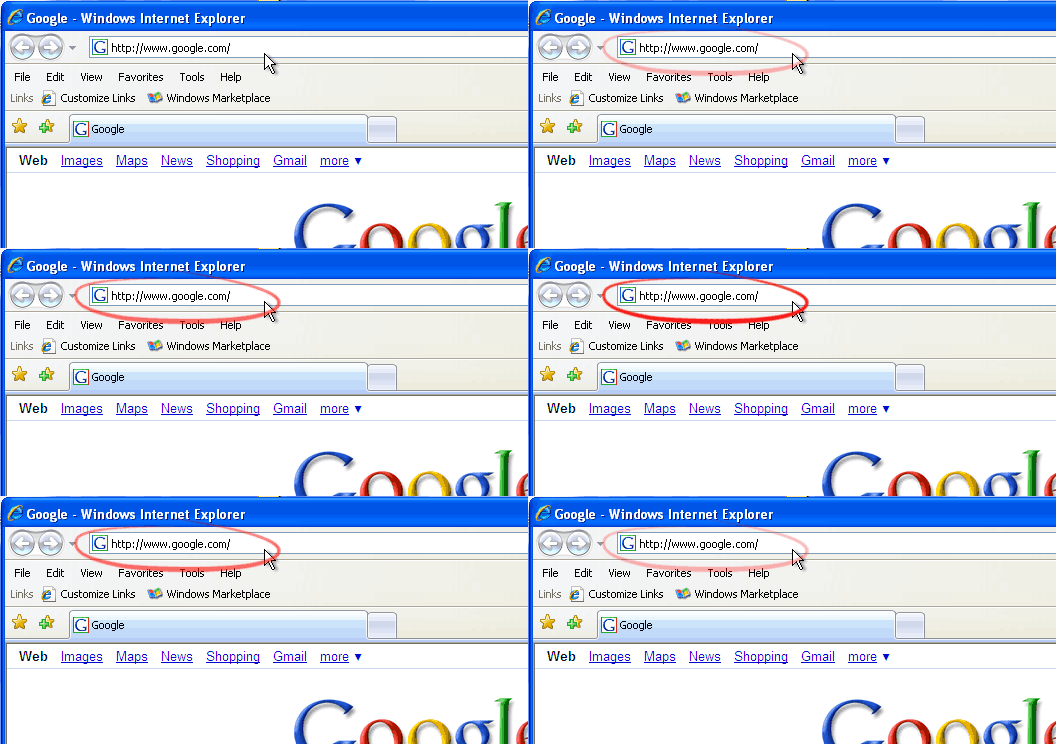
Every Web browser has an address bar. And the address bar shows you where you are. The address bar is at the top of the browser window, like so.

Most people get a sense of where they are by looking in the middle of the page. If they see familiar logos and familiar words, they assume they are where they want to be.

But a Web page is easy peasy to fake. All those professional-looking logos can be copied in a computer in a couple fo seconds with a few clicks of a mouse.

And remember how I said these guys know human psychology? They really, really know human psychology. And they use psychological tricks to confuse you with the URL.

You know how your bank and eBay and all of those places always tell you to make sure your browser address bar shows the right address when you go to their page? It’s worthless advice. You know why?

You’re lazy.


Yes, that’s right. I don’t even know you and I know you’re lazy. I’m lazy. Everyone is lazy. Human brains are designed and optimized to make rapid evaluations and rapid decisions with a minimum of effort. You’re lazy, and the hackers know it.

When you look at a Web site address–if you look at a Web site address–your eye begins reading it, and then you stop reading if you see something that looks familiar.

It’s how your brain works, and the hackers are very well aware of that.

So here’s what your brain does when you see a Web address:

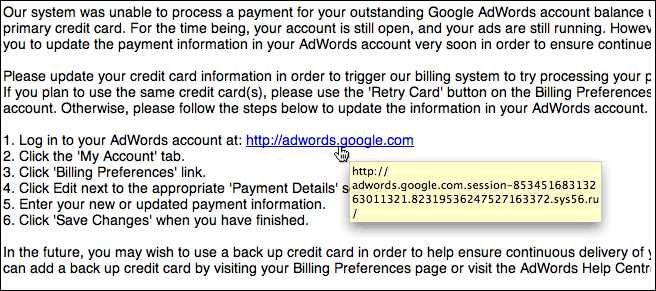
You read the URL until you see something that you recognize. Then you stop. Your brain says “Yes, I recognize this; all the gobbledygook at the end doesn’t matter. I know where I am; I’m at adwords.google.com.”

WRONG!

You’ve just been suckered.

When you read a URL, the only part that matters is the part right before the FIRST slash after the http:// part. Here is the RIGHT way to read a URL:

Step 1: Look for the very first slash after the http:// part:

Step 2: Read the part right before that slash.

Got it? This Web site is not adwords.google.com. This Web site is sys56.ru. The “.ru” part means “russia”. You are at looking at a confusing URL designed to trick you into not noticing that you’re at www.sys56.ru.

See how it works? Let’s try again, with a fake Web site pretending to be Wachovia Bank.

Step 1: Look for the very first slash after the http:// part:

Step 2: Read the part right before that slash.

Where is this URL? This URL is at winnerresult.com. Not Wachovia; winnerresult.com.

Sometimes, there is no slash at all after the http:// part. If there is no slash at all anywhere in the address, then you look at the end of the address:

A real eBay signin address is

http://signin.ebay.com/ws/ebayisapi.dll

See the red slashes? In the fake, they are dots, not slashes. How do you know the real one is real? Follow the two simple steps: step 1, look for the first slash after the http:// part, and step 2, read what’s right in front of it.

http://signin.ebay.com/ws/ebayisapi.dll

Look for the first slash in a Web address. Check out what’s right in front of the slash. Those two steps will save you from getting suckered.

In part 2, I’ll cover some telltale signs that a Web site is trying to download a virus onto your computer.

The election is over…

…and not even twelve hours after Obama’s acceptance speech, Eastern European organized crime are using America’s feelings about this historic moment to spread computer viruses.

A little while ago, I posted about a gang of computer criminals who, while building a network of hacked computers to use to spread viruses and fake bank sites, had hacked a system belonging to the US Department of Defense.

Those very same criminals are now hitting my inbox with messages attempting me to visit a server that downloads a computer virus disguised as a news story about Barack Obama’s victory.

I’ve received two of the emails so far. Both are formatted the same way, and are identical in formatting to the phish emails that masqueraded as a bank “security update.” The first carries a subject line reading “Obama win sets stage for showdown;” the second, “Priorities for the New President – TIME”. Both come from the forged email address “news@unitedstates.com”.

First, the technical stuff about how this computer virus is being spread.

Well, THERE’S something you don’t see every day!

Lately, I’ve been getting a spate of “phishing” emails, at about two a day. These mails claim to come from a bank, and say something along the lines of “Your online banking has been suspended, you need to give us your banking details again.” They then point to a fake Web site that looks just like a real banking site, and try to dupe victims into typing their bank account numbers and passwords and such into the fake site. All pretty bog-standard so far.

The past few weeks has seen a very specific type of phish that’s relatively unusual; rather than trying to get me to type in my account number and password, these phish emails lead me to a site that tries to get me to download a “browser encryption update” to my computer. The “update” is, of course, a computer virus that records everything I do in my browser and sends it back to the hackers. A bit of a twist on the idea, but still basically the same thing.

What’s surprised me is the sophistication of these phishes. The fake Web sites have really long names, such as

http://ktt.key.ktt.cmd.logonFromKeyCom.productsremote.KUTglSiqAY.rnalid.viewcontent.ttioense.com/logon.htm
( *** WARNING *** *** WARNING *** *** WARNING *** This site is live as of the time of this writing, and WILL try to download malware onto your computer!)

What’s unusual about this is three things.

First, the hackers are registering a domain, rather than just hanging the phish off of a hacked Web site.

Second, the hackers are putting this domain on a large number of computers, probably hacked home PCs, spread out all over the world, so that if one of them is shut down the others will still work. As of the time of this typing, ttioense.com is living on ten different IP addresses in ten different parts of the world.

Third, the hackers are running their own name servers. They are hacking computers, setting up name servers on those computers, and then using those name servers to set up sites that pretend to be bank sites and try to download malware. Essentially, they are creating their own “shadow Internet”–their own Web sites set up on hacked computers, and their own domain name servers also set up on hacked computers.

Still pretty bog-standard, if technically sophisticated.

Hold on to your hat, Dorothy, because Kansas is about to go bye-bye.

As of the time of this writing, ttioense.com, the fake bank Web site that tries to download a virus, has two name servers:

Domain name: ttioense.com

Technical Contact:
Pamela Saul pamela@yahoo.com
3366810811 fax: 3366810811
5903 Shenandoah Road
Greensboro NC 27405
us

Billing Contact:
Pamela Saul pamela@yahoo.com
3366810811 fax: 3366810811
5903 Shenandoah Road
Greensboro NC 27405
us

DNS:
ns1.dabchecks.com
ns2.dabchecks.com

Created: 2008-10-15
Expires: 2009-10-15

Now, ns1.dabchecks.com is running on a server in the UK belonging to a company called UK Dedicated Servers Limited.

On the other hand, ns2.dabchecks.com…

ns2.dabchecks.com is running at 22.25.119.21, on an IP address belonging to the United States Department of Defense. Specifically, 22.25.119.21 belongs to the Department of Defense Network Information Center–a military network so paranoid that their main Web site won’t let you log on unless you have a special access card and you’re connecting from a .mil address.

whois 22.25.119.21

OrgName: DoD Network Information Center
OrgID: DNIC
Address: 3990 E. Broad Street
City: Columbus
StateProv: OH
PostalCode: 43218
Country: US

NetRange: 22.0.0.0 – 22.255.255.255
CIDR: 22.0.0.0/8
NetName: NICS0175
NetHandle: NET-22-0-0-0-1
Parent:
NetType: Direct Allocation
Comment:
RegDate: 1989-06-26
Updated: 2007-07-06

OrgTechHandle: MIL-HSTMST-ARIN
OrgTechName: Network DoD
OrgTechPhone: +1-614-692-2708
OrgTechEmail: HOSTMASTER@nic.mil

And that isn’t something you see every day.

Good news for Mac owners

So it turns out we may see a respite, even if only for a while, in new infections with the Mac DNSchanger malware.

The story starts with an Estonian company operating out of the US, called ESTdomains, and its associated Web hosting company, ESThosts. ESTdomains is the preferred domain registrar for Eastern European cybercriminals, who often host viruses and malware on its sister company ESThosts.

ESThosts relies on an upstream ISP called Intercage for its connection to the Internet. Happily, Intercage, which has long turned a blind eye to all kinds of criminal activity on the Internet, finally crossed the line and was dropped by its service provider. An new upstream provider rode to its rescue, only to have its packets dropped by an Internet backbone provider.

Why is this happy news for Mac users?

A while ago, I mapped out an underground network of virus and malware droppers, some of which were being used to spread the Mac version of the Zlob, aka OSX.DNSchanger, OSX.RSplug.A, or OSX.RSpluginA, malware.

Many of the sites that spread this malware were disguised as porn sites. Other sites were legitimate sites that had been hacked. Still other sites contained outdated, insecure versions of popular blogging or forum software such as WordPress and PHPnuke, and had been hacked to carry redirectors to the malware. Still other sites disguised the malware as antivirus software, or browser plug-ins, or any number of other things.

But–and here’s the interesting part–all of these fake porn sites, hacked blogs, hacked Web sites, hacked forum sites, and bogus software sites all pulled the malware from the same repository, a server living at IP address 64.28.178.27.

Which is in Intercage’s IP space, and so is currently unreachable.

Meaning that as of right now, the one server being used to spread the Mac DNSchanger malware is offline.

Now, I have no doubt that the bad guys are going to move the Mac malware to a different server at some point. But they are going to have to rejigger the rest of the network to point to the new server, which will take time. In the meantime, we should see a lot fewer infections with this malware.

In which Franklin gets all Medieval on the weekend’s ass

This has been a hella productive past few days, and I am well and truly pleased.

The first chapter of the book on polyamory is done, finished, put a fork in it. Proposals have been sent out. Chpter 2 is started. Chapter 3 is halfway done.

Downed the first two bosses in Serpentshrine Caverns and the first two bosses in Tempest Keep with my new raiding guild. My mage rocks like a rocky thing. It’s just a pity she’s Alliance.

Got a surprise phone call on Friday. The attacks against iPower Web, which are not only ongoing but are getting more sophisticated (since I wrote that last, the number of compromised iPower sites has surged again), are coming to the attention of iPower’s customers. I received a phone call from a woman whose site had been hacked (twice!), and she had iPower on the phone when she called me.

The tech support monkeys at iPower told her that–get this–there’s no vulnerability on their servers, and that her account was compromised because the attackers brute-forced her FTP password. Which was…err, sixteen characters, both letters and numbers, long.

*blink*

Anyway, she gave them the what-for and pulled all her sites off iPower. Maybe if they start losing enough customers, they’ll fix their damn security.

And on the subject of Web sites, I’ve updated mine. I don’t know what I’m going to do when I have a book in print and can’t keep tinkering with it.

Last night, David and I tried playing as a team against six computer opponents in Age of Empires II. High difficulty, lowest resource setting. It was a humiliating debacle. We well and truly got our asses handed to us. Barely made it into the Imperial Age before the computer’s armies closed around us and systematically scraped us off the map.

In two weeks I’ll be in Chicago; planning to be there from the 19th through the 24th. Looking forward to spending time with dayo and scathedobsidian, I know you’ll be around. amorsalado, purplebard, will you guys be available?

Security is hard.

So the past few weks have been rough on Microsoft and on Adobe. First, a flaw in Microsoft SQL Server allows ASP sites to be compromised by a general SQL injection attack; then a flaw in the Adobe Flash player allows a miscreant to hijack the Web browsers of people with the Flash plugin installed.

In both cases, the vulnerabilities have been exploited to try to redirect surfers to a Web site at www.dota11.cn, which hosts a malicious script that tries to infect users’ computers with a virus.

That’s the old news.

The funny news–and believe me, I think this is fucking hysterical–is that one of the Web sites clobbered by the SQL injection attack is redmondmag.com, a Web site that is “the independent voice of the Microsoft IT community.” It’s a pro-Microsoft, look-how-great-we-are “news” site that has been so massively infected that…

uh…

…well, if you Google it, Google gives you a “this site may harm your computer” warning.

Many of the infected Web pages are pages about computer security–or, at least, apologies for Microsoft products masquerading as articles on computer security.

I know, I know, the real assholes here are the hackers, but still…goddammit, I can’t stop laughing.

Security is hard.

And it gets harder when ISPs are aware of security problems on their network but don’t care. And believe it or not, I’m not talking about iPower this time.

Actual IM transcript from a conversation with xmission.com:

Tacit: You are hosting a phish.
Tacit: ftp://webmaster:webmaster@204.228.142.40/.ws/eBayISAPIi.dll
catalyst: chill, you could send a notification to abuse@xmission.com or to phish@ebay.com or whatever they have now
Tacit: Sent it two weeks ago.
Tacit: And a week ago.
Tacit: No response, phish still active.
Tacit: Two weeks is a long time.
Tacit: Your abuse@ address appears to be routed straight to /dev/null.
catalyst: I’m not an xmission employee, so I can’t help, just thought I’d recommend some alternatives
rostrax: Abuse is a valid e-mail address and it is looked at.
rostrax: That would be my suggestion on what to do.
Tacit: Again?
Tacit: How many times do you think I should send the same email to abuse@xmission.com before I conclude that xmission supports and condones hacks and phishes on their network?
rostrax: How many times have you sent it?
Tacit: Four.
Tacit: First one two weeks ago.
rostrax: I cannot speak for our abuse team, but I’m sure they’ve looked into it
Tacit: If they’ved looked into it, and it’s still active, what conclusion would you draw from that?
Tacit: 204.228.142.40 is on your network, yes?
rostrax: It is one of the IP’s we have yes.
Tacit: And if you click on the above link, you would agree that it is definitely an eBay phish, yes?
rostrax: You have to understand business’ have certain ways of handling these things. It may take some time. Please be patient with us, if you could send another e-mail I would appreciate it greatly. Also cc it to rostrax [at] xmission.com
Tacit: I do understand that businesses operate certain ways; I run one myself. Two weeks to handle a phish? Even China Netcom deals with phish sites faster…
rostrax: I’m unsure of our particular policy, but if you can send the e-mail and cc me on it, I will look into it on Tuesday


Edit: It gets better. Apparently, this phish has been active on Xmission’s network since at least April 9th.